Best 5 Skills for Faceless YouTube Channels (2026)
Best skills for a faceless YouTube channel on Tubemk: a narrated explainer, a stick-figure story, a kinetic-text Short, shot prompts, and a Remotion toolkit. Fit only.
By Tubemk · · faceless youtube, explainer, shorts, b-roll, voiceover
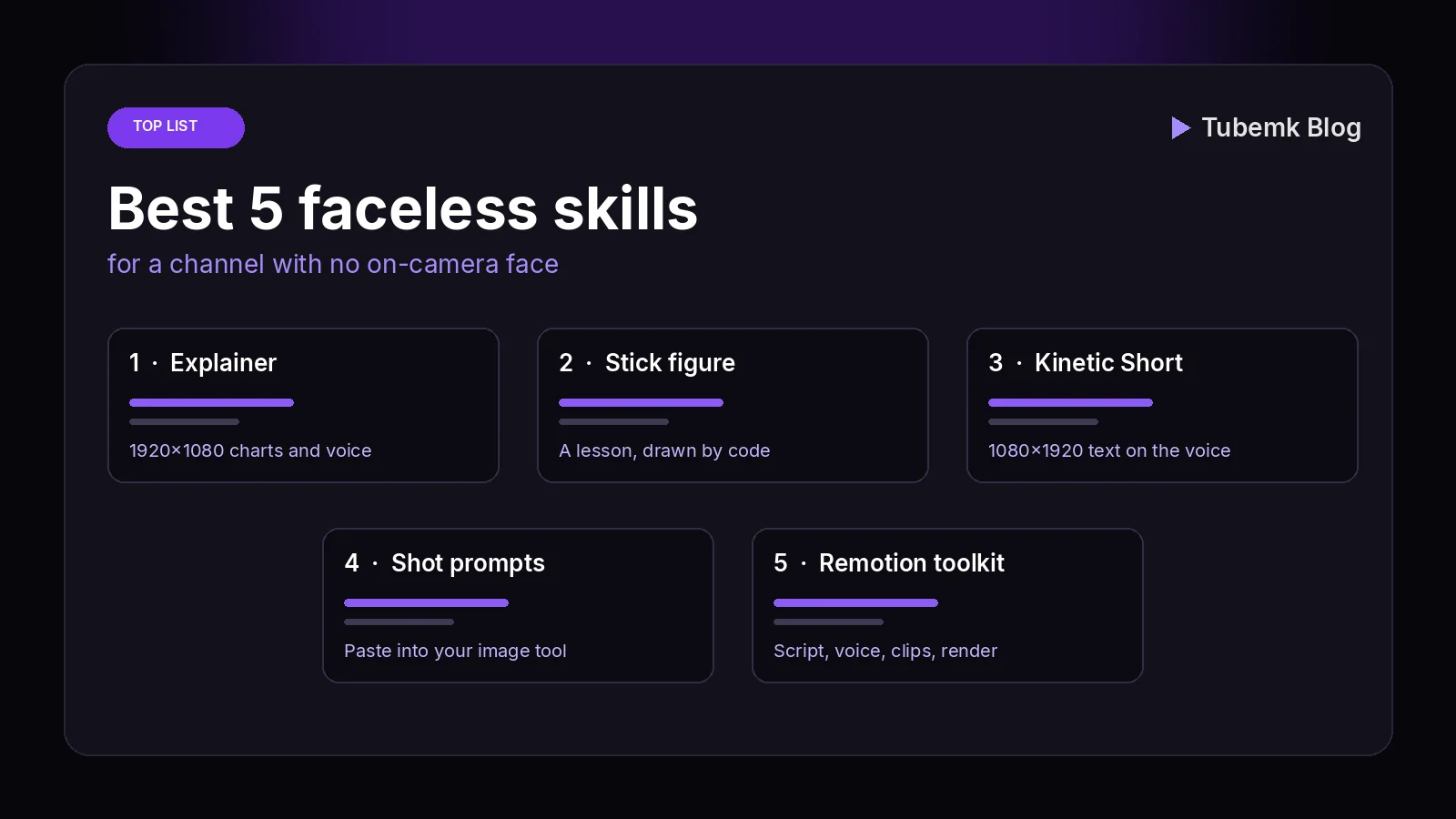
A faceless YouTube video is a voice plus pictures, with nobody filmed on camera. A narrated explainer, a stick-figure story, a kinetic-text Short, a set of shot prompts, and a project that generates the script, the voice and the clips are five different ways to make that video. This guide ranks the automation skills on the Tubemk shelf whose listing is one of those jobs. It is a fit ranking: which picture the skill is built for, where it runs, and what the listing said on 18 November 2026. It is not a watch-time study, and it does not invent views, ratings or revenue.
The faceless format page, checked the same day, shows five automation skills. Three of them return a finished file from a topic or a script. One writes prompts and does not render. One is a Claude Code workspace whose listing says it makes the script, the voice, the music, the clips and the render. A directory is not included. A tool that speaks, a tool that paints a still, and a workflow that posts a Short on a schedule are linked later, not ranked.
We also looked for a research ranking first. Topic research, outlier research, comment research and trend scanning do not have an automation skill on this shelf. One skill turns a YouTube link into text you can mine. A custom GPT that summarizes a competitor video is filed as a tool. Both are linked below. They are not a second research skill, so this page is the faceless ranking.
We judged each skill on four things:
- Step: a finished 16:9 explainer, a finished stick-figure story, a finished 9:16 Short, prompts for cutaways, or a Remotion project that generates the pieces
- Where it runs: on your machine, inside a chat agent, or in Claude Code
- Access: the listing price on 18 November 2026, and whether the picture step needs an API key
- What we can check: the Tubemk listing that day, and, for the toolkit, the README the same day
Quick picks
- A narrated 1920×1080 explainer, with charts: explainer-animator
- A lesson told with stick figures: stick-figure-stories
- A 1080×1920 Short made of text on the voice: motion-shorts
- Shot prompts you paste into an image tool: broll-prompt-director
- A Claude Code project that writes the script and generates the clips: claude-code-video-toolkit
A channel that only posts Shorts can stop at motion-shorts. A channel that posts long explainers can stop at explainer-animator. The format changes the frame. It does not add a sixth faceless skill to the shelf.
Tubemk catalog, ranked
The order below is the kind of finished picture, then the prompt, then the project that generates the pieces. It is not a quality score.
1. explainer-animator: the narrated explainer
 Demo
Turn a topic into a narrated 1080p animated explainer
 Explainer Animator · by Tubemk Studio
Topic or script in, finished 1080p animated explainer out: voice, word-synced captions, charts, music and sound effects. Runs on your computer.
For: Editing, Voiceover · Faceless storytelling, Animation / recap
The listing title is "Turn a topic into a narrated 1080p animated explainer". The faceless-format card files it under Editing and Voiceover, for faceless storytelling and animation / recap. The page also describes word-synced captions, music and sound effects. Sold by Tubemk. The price on the listing on 18 November 2026 is $29, buy once. The license line says the skill is Tubemk's intellectual property, licensed for your own use, and asks you not to share or resell it. The requires line is Claude Code, Codex or Cursor, Python 3.10–3.12, and ffmpeg. The page says the scripts can also run from a terminal.
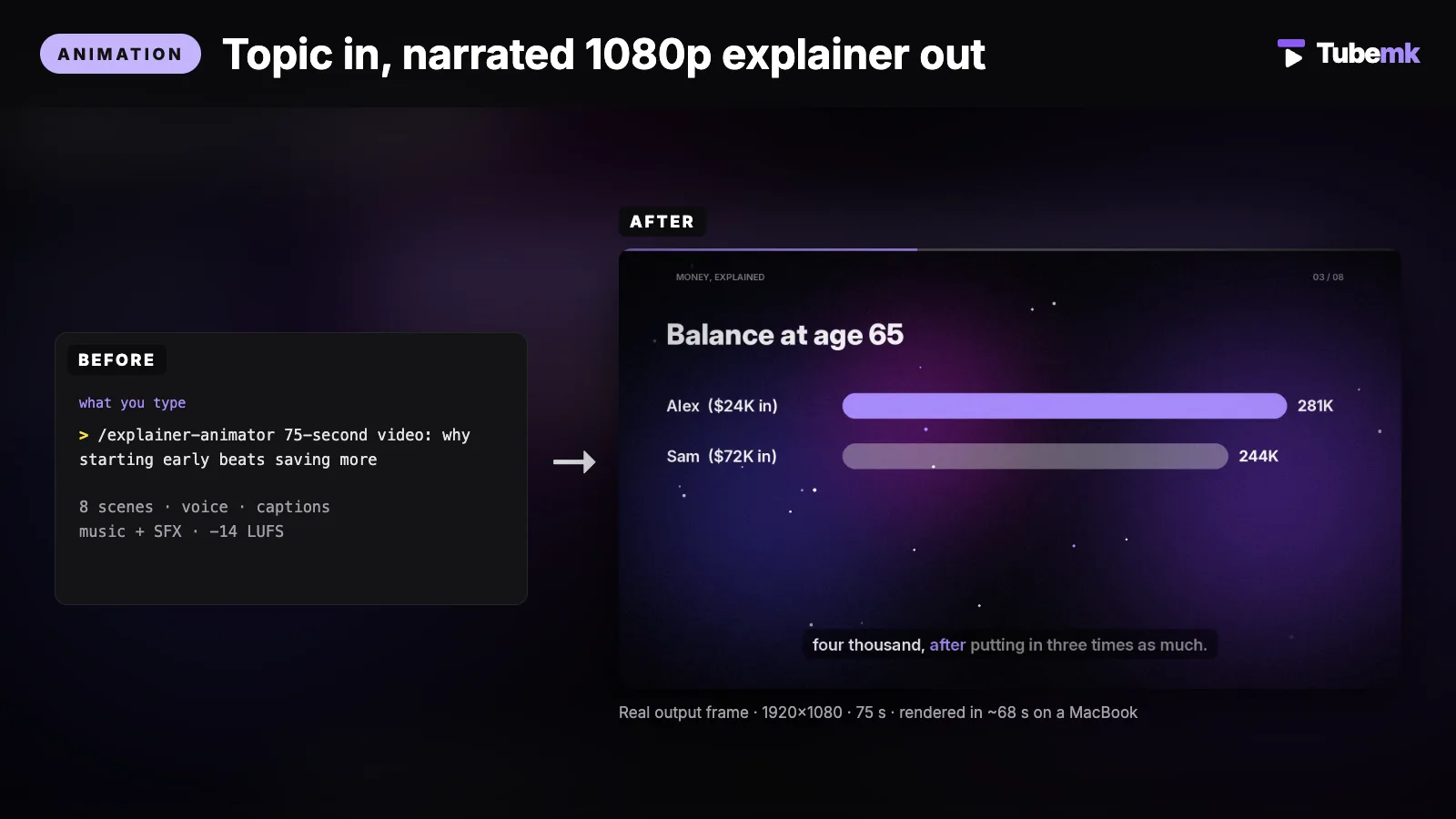
What the listing says it does: give it a topic, notes or a full script and get a finished 1920×1080 explainer. Voice-over, kinetic titles, charts, comparisons, timelines, word-synced captions, music and sound effects, mastered to -14 LUFS. The "use it when" line names a faceless education, finance or history channel.
The same page, that day, lists these steps:
- It writes a storyboard of 6–10 scenes. The scene types it names are title, stat, compare, bars, timeline, flow, bullets, quote and outro. It shows you the list before it renders.
- Each bullet, bar and number appears when its word is spoken. Captions follow word by word.
- Music, whooshes, pops and risers are generated for the cut. The page says there is no stock track to license.
- Loudness is two-pass, to -14 LUFS, with true peak at or below -1 dBTP. The page calls that the level YouTube plays at. That is the page's statement.
- Three looks: midnight, slate or light, plus an accent colour, and seven English voices.
- It writes a contact sheet and a QC report for size, loudness and word timing.
The voice the page names is Kokoro am_adam, Apache-2.0. Word timing is faster-whisper, MIT. Both download once, about 400 MB, on the first run. The computer line says macOS 13+ on Apple Silicon, tested on an M5 Pro MacBook. It says the code supports Windows 10+ and Linux, and that those two have not been tested. Memory is 8 GB minimum, 16 GB recommended. Disk is about 2 GB free: 1.6 GB of Python packages on a clean install, plus the voice and Whisper models. ./install.sh creates a private .venv.
The limit line: English narration only in this version. Motion graphics only. No stock footage and no AI images. Charts show the numbers you give it. The page says it does not look facts up.
The demo block on the same page describes one run: a 75-second video, voice am_adam, 1920×1080, -14.3 LUFS, rendered in about 68 seconds on a MacBook. The "how to use" line says a 75 s video took about 68 s on our MacBook. The flow caption names 2,247 frames and -14.3 LUFS. Those are the page's figures for its own demo, not a render we ran.
- Pros: a finished 16:9 explainer from a topic, with the storyboard shown before the render. No image-model key. The voice, the captions, the music and the loudness are in the same file.
- Cons: the price is $29, and the license is Tubemk's, for your own use. English only. It will not fetch a statistic for you. A chart is only as true as the number you typed. Windows and Linux are untested, on the page's own line. You still approve the scene list.
Use this for a narrated explainer when the picture is type, charts and timelines, and you do not want a filmed face.
2. stick-figure-stories: the lesson as a story
 Demo
Turn a lesson into a narrated stick-figure story
Stick Figure Stories · by Tubemk Studio
A lesson or story in, a narrated 1080p stick-figure animation out: poses, faces, speech bubbles, props, captions and music. Drawn by code.
For: Editing, Voiceover · Faceless storytelling, Animation / recap
The listing title is "Turn a lesson into a narrated stick-figure story". The shelf files it under Editing, Voiceover and Captions. The formats are faceless and animation / recap. Sold by Tubemk. The price on 18 November 2026 is $19, buy once. The license line is the same as the explainer: Tubemk's intellectual property, for your own use, and a request not to share or resell it. The requires line is the same: Claude Code, Codex or Cursor, Python 3.10–3.12, and ffmpeg.
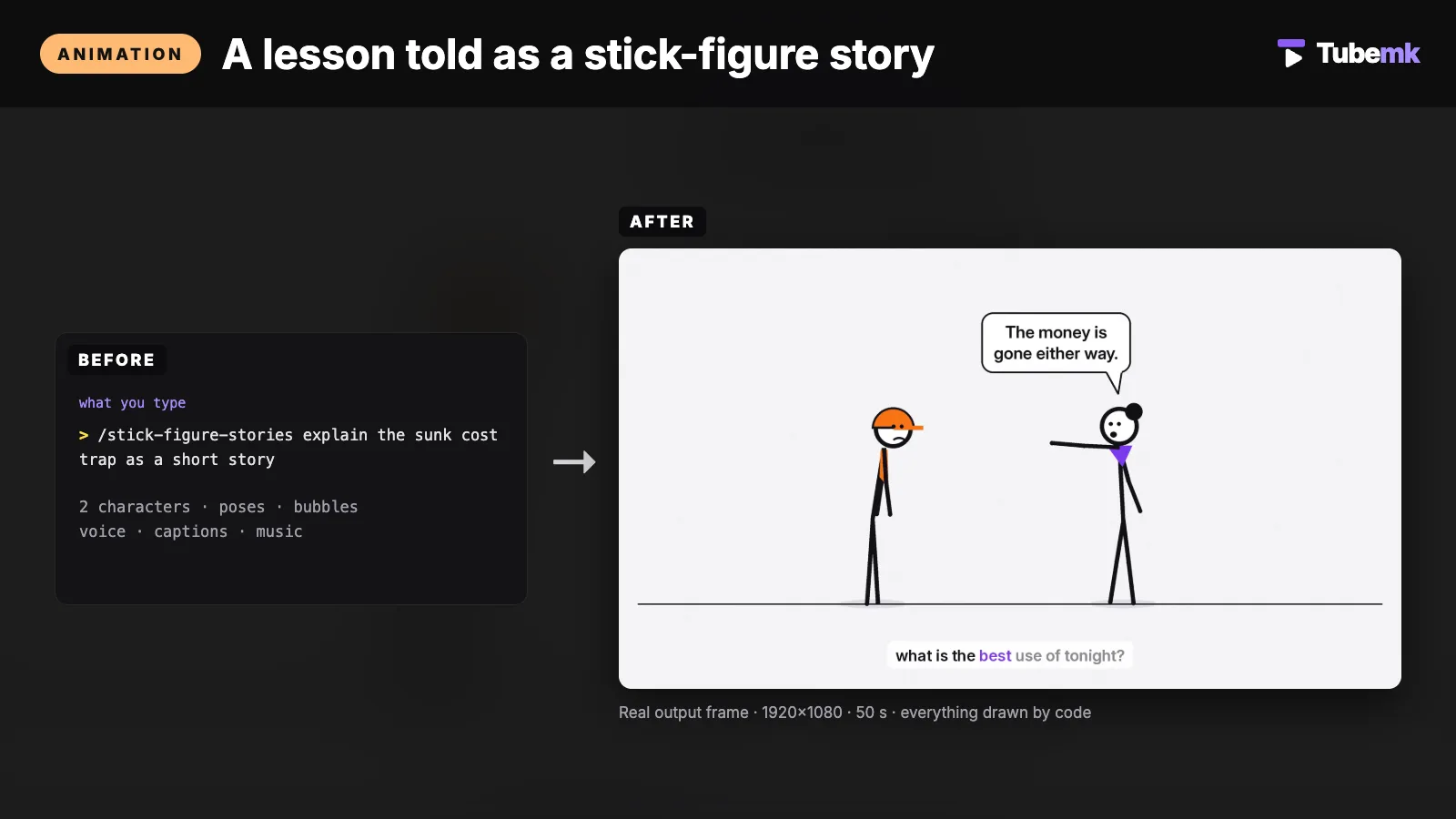
What the listing says it does: give it a lesson, concept or short story and get a narrated 1920×1080 stick-figure animation. Characters with poses and faces, talking mouths, speech and thought bubbles, props, scene titles, word-synced captions and music. The "use it when" line names psychology, money or life lessons told as little stories.
The page's own feature list, that day:
- A cast you direct: name, colour, hair and outfit. It names 12 poses, including wave, point, think, shrug, cheer, facepalm and panic, and 4 faces.
- Poses, moves, bubbles and props change on a word you choose in the narration.
- Props it names: desk, laptop, phone, money, clock, charts, ticket, rain, bed, house, stage, lightbulb. All drawn by code.
- Kokoro voice, word-by-word captions, music and sound effects, mastered to -14 LUFS.
- No AI images. The page says every frame is drawn from code, so there is no image model to pay and no style drift between scenes.
- A contact sheet for bubbles or props that clip.
The computer, the disk and the first-run download are the same lines as the explainer. The voice it names is Kokoro am_adam. The limit line: side-view 2D figures on one ground line, no detailed backgrounds. Mouths move while words are spoken. The page says there is no phoneme lip-sync. English tuned.
The demo block says the finished output is uncut, 50 seconds, 1920×1080, -14.4 LUFS, rendered in about 104 seconds on a MacBook. The "how to use" line says a 50 s story took about 104 s on our MacBook. Those are the page's figures for its own demo.
- Pros: a finished story video with a cast, bubbles and props, drawn by code. No image API. The voice and the captions ship in the same render.
- Cons: $19, and the same Tubemk license. One ground line and no detailed background. Mouths are not phoneme-synced. English tuned. You still read the contact sheet.
Use this for a stick-figure story when the lesson is a scene with characters, not a chart.
3. motion-shorts: the kinetic-text Short
 Demo
Turn one idea into a kinetic-text Short in two looks
Motion Shorts · by Tubemk Studio
One idea in, a finished 1080x1920 kinetic-text Short out: word-by-word text synced to the voice, keyword pops, music and SFX. Two looks.
For: Vertical / Shorts, Captions · Shorts, Faceless storytelling
The listing title is "Turn one idea into a kinetic-text Short in two looks". The faceless-format card shows Vertical / Shorts and Captions, for Shorts and faceless storytelling. The listing also describes the voice, the music and the sound effects. Sold by Tubemk. The price on 18 November 2026 is $19, buy once. The license line matches the two skills above. The requires line matches them too.
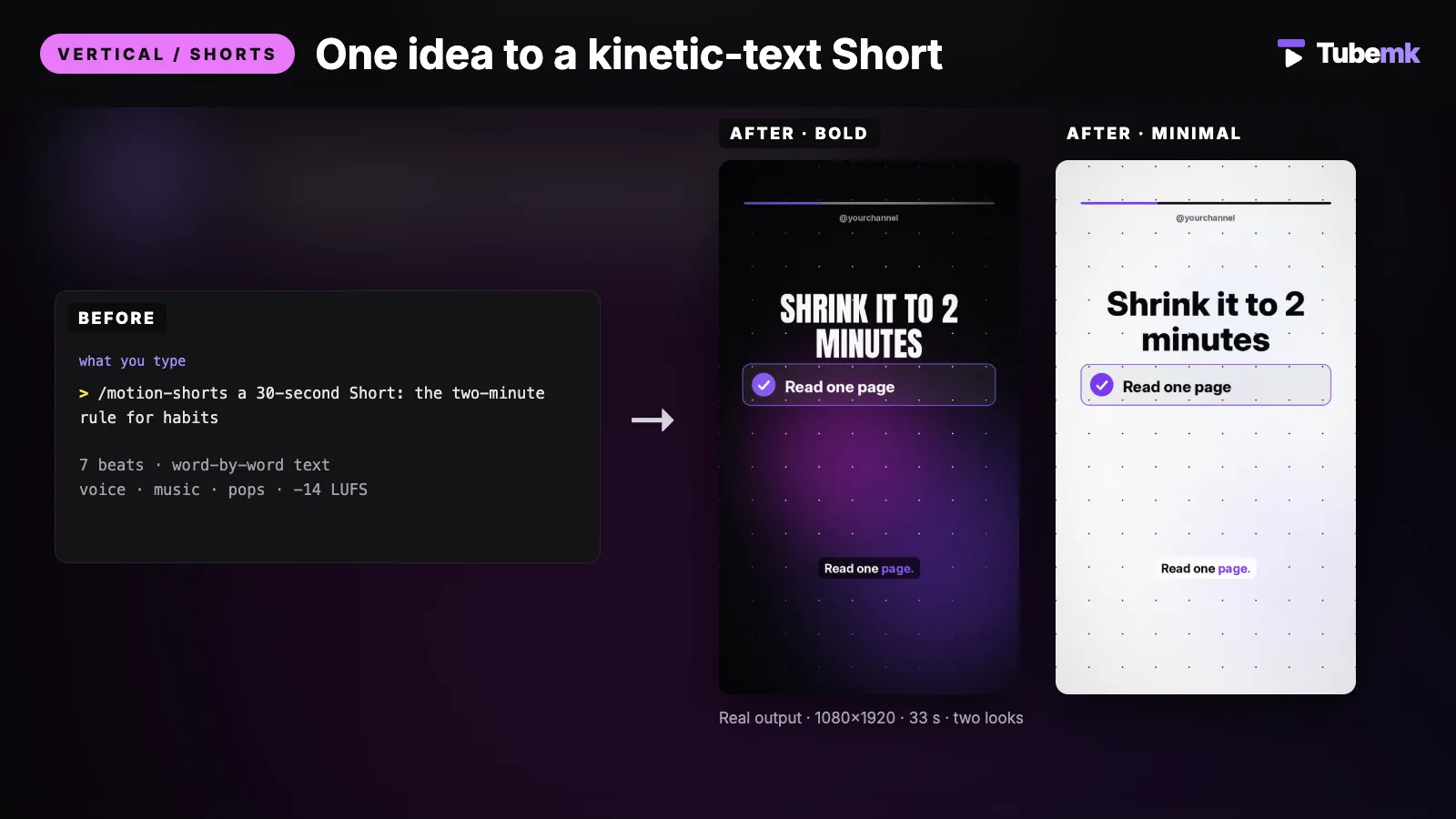
What the listing says it does: give it one idea, one tip, or an 80–140-word script and get a finished 1080×1920 Short. Word-by-word text synced to the voice, keyword pops, checklists, number reveals, versus cards, a call to action, music and sound effects at -14 LUFS, in two looks. The "use it when" line names faceless tips, facts or mindset Shorts.
The page's feature list:
- Each word appears when it is spoken. Keywords pop in a highlight box.
- Two looks from one script: bold (dark, condensed caps) and minimal (light, clean). The page says to render both. It does not report a test of which look was clicked.
- Beat types: hook, word run, checklist, big number, versus card and call to action.
- Key text stays between 15% and 75% of the height. The page says that keeps it clear of the Shorts, Reels and TikTok buttons.
- Drive or calm music, plus pops, whooshes and a riser. Generated. Nothing to license, the page says.
- The file line: 1080×1920, 30 fps, -14 LUFS, true peak at or below -1 dBTP, a progress bar and your @handle.
The computer lines match the explainer. The limit line: text-only motion graphics, no footage and no AI images. English tuned. Very long words are auto-shrunk.
The demo block describes two files from one script. Look 1, bold: 33 seconds, 1080×1920, -14.3 LUFS, rendered in 58 seconds. Look 2, minimal: the same script and the same voice, rendered in 31 seconds. The "how to use" line says a 33 s Short took 31–58 s on our MacBook. Those are the page's figures.
- Pros: a finished vertical Short from one idea, in two looks, with the voice already in the file. No footage to film.
- Cons: $19, and the Tubemk license. Text only. It does not show a place, a product or a chart. English tuned. A long word is shrunk, not rewritten. You still read the line before you upload.
Use this for a kinetic-text Short when the whole picture is the words.
4. broll-prompt-director: the shot prompts
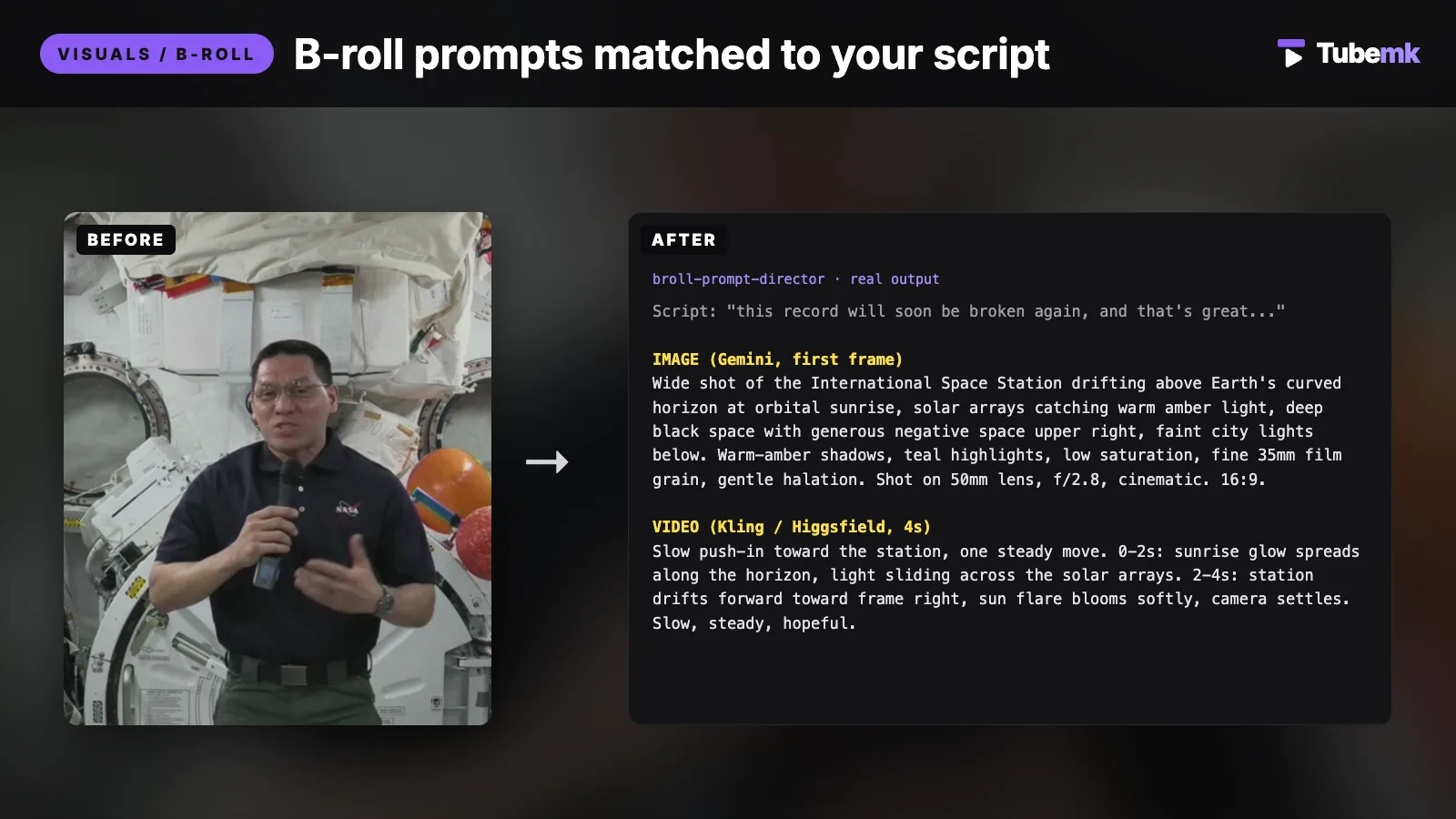
The listing title is "Write B-roll prompts for every line of your script". The faceless-format card files it under Visuals / B-roll, for faceless storytelling and talking head. Sold by Tubemk. The price on 18 November 2026 is $9, buy once. The license line is Tubemk's intellectual property, for your own use. The page says there is no install: a skill file under 1 MB. It makes no API calls. The agent line is a paid Claude account, a paid ChatGPT account, or any chat AI you already use.
What the listing says it does: give it a line of the script, and reference images if you have them, and get paste-ready prompt pairs. An image prompt for the first frame. An image-to-video motion prompt for Kling or Higgsfield. The "use it when" line is cutaways that match what you are saying and look like one set.
The page's feature list: a Style DNA card from 9 axes, locked for the whole set. An image prompt with subject, framing, light, lens and aspect ratio. A motion prompt with one camera move, timed beats, 3–5 seconds, slow. A negative prompt on every shot. Kling or Higgsfield, or both. A whole-script mode that splits the script into beats and writes one markdown file. The limit line: it writes prompts only. Generating the images and the clips happens in your own tools.
The same job, read as a B-roll step with the prompt file opened, is ranked in Best 3 skills for faceless YouTube B-roll. This page ranks it as the faceless cutaway you still have to generate. The three skills above do not call Kling. This one does not render.
- Pros: the words for a photographic or cinematic cutaway, with one style for the set, and no API call inside the skill. $9.
- Cons: the file you upload is not in this skill. You still pay the image tool and the video tool, if they charge. A talking-head channel can use the same prompts. The license is Tubemk's, for your own use.
Use this when the faceless picture has to be a generated shot, and you already have the tool that will render the prompt.
5. claude-code-video-toolkit: the project that generates the pieces
Produce Remotion videos with Claude Code
 claude-code-video-toolkit · by digitalsamba
Make videos with Claude Code: script, AI voiceover, music, video clips and render, on open-source models that cost cents
For: Script, Voiceover · Screen tutorial, Faceless storytelling
★ 2.4k GitHub stars
The listing title is "Produce Remotion videos with Claude Code". The shelf files it under Script, Voiceover and Editing. The formats on the listing include screen tutorial and faceless. By digitalsamba. Free resource, not sold by Tubemk. MIT. The requires line is Claude Code or Cursor. The listing says it needs a computer with Python and ffmpeg, and that it will not run inside claude.ai or ChatGPT on the web.
What the listing says it does: make videos with Claude Code, including the script, an AI voiceover, music, video clips and a render, on open-source models that cost cents.
On 18 November 2026 the README says you tell Claude Code what video you want and it writes the script, generates the voiceover, music and visuals, and renders an MP4. The same paragraph prices voiceover at about $0.01 and AI video clips at about $0.23. Those are the README's figures, not a bill we ran. It says the requirements are Node.js 22+ (24 LTS recommended) and Claude Code, with uv recommended and FFmpeg optional. It says /video creates a project from a template. The author's note on that page describes the toolkit as a way to generate explainer-style video: product demos, walkthroughs and presentations. GitHub's license API returned MIT the same day.
The picture commands and the narration command are already ranked. Shot generation is Best 3 skills for faceless YouTube B-roll. The voice path is Best 2 skills for YouTube voiceover. This page ranks the workspace as the faceless project that holds both. A screen tutorial is the other format on the listing. A filmed face is not what the listing describes.
- Pros: one Claude Code project for the script, the voice, the music, the clips and the MP4. The code is free and MIT. The listing is on the faceless format.
- Cons: the speech and the clips are not free of an account. The README's cent prices are cloud-model prices. The listing's job is the whole video, so you are in that repo, not in a one-file skill. You still direct it. The three Tubemk skills above are the ones whose pages say the render stays on your machine with no API key.
Use this when the faceless video is a Remotion project and you want the toolkit to generate the pieces, including a shot the prompt skill only describes.
A practical faceless workflow
Chain them in this order. Skip a step when you do not need that job.
- Name the video yourself. None of the five looks up a trend, a comment thread or an outlier. A link you have the right to read can go through claude-skill-video-transcribe, which the listing says turns a YouTube or Bilibili video into text you can mine. That skill is ranked as the reading step in Best 2 skills for YouTube SEO. A summary of a competitor video is the tool YouTube Video Summarizer. The words, once you have a question, are Best 3 skills for YouTube scriptwriting.
- Render a chart explainer with explainer-animator when the video is 16:9 and the picture is type and numbers. Approve the 6–10 scenes. Type the figures yourself. The page says the skill does not look them up. English only.
- Or tell the lesson as a story with stick-figure-stories when you want characters, bubbles and props. Read the contact sheet. The page says the mouths are not phoneme-synced.
- Or make the Short with motion-shorts when the picture is the words, at 1080×1920. The page says the text sits between 15% and 75% of the height. Render bold, or both looks. The page does not say which look gets the click.
- Write shot prompts with broll-prompt-director when the frame has to be a generated place or object. Paste them into the tool you already pay for. The skill does not return the clip.
- Or open claude-code-video-toolkit when you want that repo to generate the voice and the clips and render a Remotion MP4. Read the cent prices in the README before you spend the call. The voice and the shots are the guides linked above.
- Caption what you did not already caption. The three Tubemk renders include word-synced captions, on their own pages. A file that does not is ranked in Best 4 skills for YouTube captions. The title is Best 2 skills for YouTube SEO. The cover is Best 2 skills for YouTube thumbnails.
- Read the file before you upload. A chart with a number you did not check is still your number. A prompt you did not read is still your shot.
Browse every faceless listing, including the tools this page does not rank, at faceless storytelling. The explainer and the stick-figure story sit with editing on the Editing stage. The Short sits on the Vertical / Shorts stage. The prompts sit on the Visuals / B-roll stage. The toolkit's voice sits on the Voiceover stage. A filmed Short is a different job: Best 6 skills for turning long videos into YouTube Shorts.
How to choose
- Use the explainer when the video is a 16:9 lesson with charts. That is
explainer-animator, $29 on the listing. - Use the stick figures when the lesson is a scene with people who are drawings. That is
stick-figure-stories, $19. - Use the kinetic Short when you have one idea and the frame is 9:16 text. That is
motion-shorts, $19. - Use the prompt skill when you want a photographic cutaway and you already have an image tool. That is
broll-prompt-director, $9. It does not render. - Use the toolkit when you want a free MIT repo and a Claude Code project that generates the pieces. That is
digitalsamba-claude-code-video-toolkit. The models cost cents, on the README's figures. - The three Tubemk renders stay on your machine. The pages say no API key and no per-video fee. They also say English. They also say Apple Silicon is what was tested.
- Keep the taste. The skill can render the scene list you approved. You still decide that the video matches the sentence, and that the number on the chart is one you are willing to say.
On the shelf, but not these faceless skills
Real listings. A different type, or a different job, so they are not in the ranking above.
- A talking-head clip, cut into a format. Short Video Formats is an automation skill. The listing title is "10 proven short formats, script to finished 9:16 edit". The price on 18 November 2026 is $65. The page says it wants a talking-head clip, or a topic that becomes a script and a shot list. A person on camera is the input. It is not one of the five faceless renders.
- The same Remotion skills, as code. remotion-dev-skills is an automation skill under Editing and Captions. The listing says it is free and that a license is not stated. It teaches an agent to write Remotion code. It does not ship the explainer, the stick-figure cast or the kinetic Short above. Remotion skills pack is the same family, preinstalled. The editing guide ranks the pack for motion graphics. This page does not rank it as a sixth method.
- A topic in, a short out, as a tool. MoneyPrinterTurbo is a tool. The listing title is "Turn one topic into a finished HD short video". Free, MIT, not sold by Tubemk. The voice tools around a faceless channel are ranked in Best AI voiceover tools for faceless YouTube. Kokoro is the tool the three Tubemk pages name as the voice. The shelf type is tool.
- A generated talking face. AI-Faceless-Video-Generator is a tool. The listing title is "Make faceless videos with AI script and voice". The description says it generates a script, a voice and a talking face. Free, MIT. It requires ElevenLabs. A generated face is a different picture from the three renders above, and the shelf type is tool.
- A Short on a schedule. Create faceless YouTube Shorts with OpenAI and Orshot is a workflow. The description says an n8n workflow runs every morning, OpenAI writes a 15-second script, Orshot renders a lip-synced presenter with 9:16 captions, and the Short is uploaded. It needs n8n, OpenAI and Orshot. The license on the listing is not stated. A workflow is not a skill file.
- The words of a video you are studying. claude-skill-video-transcribe is an automation skill. It is the transcript step, not the picture. youtube-transcript-api is the tool that pulls captions with no API key. YouTube Video Summarizer is the tool that summarizes a competitor video. None of them renders a faceless file.
- An agent that runs the whole channel. youtube-automation-agent is a tool. The listing title is "Run a YouTube channel end to end with an AI agent". The description says it researches topics, writes scripts, and makes narration and visuals. The shelf type is tool, so it is not a sixth skill here.
Comparison
- explainer-animator: Editing and Voiceover, plus captions, music and sound effects on the page; $29, Tubemk license, your own use; 1920×1080; storyboard of 6–10 scenes shown before the render; Kokoro voice; -14 LUFS; English only; charts use the numbers you type; no API key
- stick-figure-stories: Editing, Voiceover and Captions; $19, same license; 1920×1080; cast, 12 poses, 4 faces, bubbles and props drawn by code; no phoneme lip-sync; no AI images
- motion-shorts: Shorts and Captions, with voice and music on the page; $19, same license; 1080×1920, 30 fps; 80–140 words; bold and minimal; text between 15% and 75% of the height; no footage
- broll-prompt-director: Visuals / B-roll; $9, same license; prompts only, no API call; image prompt plus a 3–5 s motion prompt; Kling or Higgsfield; you still render
- digitalsamba-claude-code-video-toolkit: Script, Voiceover and Editing; free, MIT, not sold by Tubemk; Claude Code or Cursor; the README prices voiceover at about $0.01 and clips at about $0.23; Node.js 22+
- short-video-formats: not in this ranking; needs a talking-head clip; $65 on the listing
- harry0703-moneyprinterturbo, samuraigpt-ai-faceless-video-generator: not in this ranking; tools
- n8n-faceless-shorts-openai-orshot: not in this ranking; workflow; a 15-second Short on a schedule
Prices change. Verify them on each listing. The dollar figures for the four Tubemk skills are the ones those pages showed on 18 November 2026. The cent figures are the ones the toolkit README stated the same day. The render times are the ones those item pages stated for their own demos.
FAQ
What are the best skills for a faceless YouTube channel? On Tubemk, the automation skills on the faceless format are explainer-animator, stick-figure-stories, motion-shorts, broll-prompt-director and claude-code-video-toolkit. "Best" here means which picture they fit. We did not score them against each other, and we did not measure views.
What is a faceless skill on this shelf, as opposed to a faceless tool? A skill file an agent can run, filed as an automation skill, and shown on the faceless format. The three Tubemk skills return a finished video. The prompt skill returns text. The toolkit is a Claude Code workspace. MoneyPrinterTurbo, Kokoro and the generated talking face are tools. The morning Short is a workflow.
Do these skills research the topic? No. The explainer page says the charts use numbers you give it, and that it does not look facts up. The shelf does not have an automation skill whose job is a trend, an outlier or a comment thread. The transcript skill and the summarizer tool are linked above. They return text. They do not return the video.
Do these skills put a person on camera? The three Tubemk renders are drawings or type. The prompt skill describes a shot. The toolkit's listing formats are screen tutorial and faceless. A filmed person, cropped to 9:16, is Short Video Formats, linked above, and the Shorts guide.
Will one of these get the video views? A file is one step. The topic, the title, the thumbnail and whether anyone clicks are separate. This page does not quote views, watch time or revenue.
Catalog gaps
Tubemk does not yet list:
- an automation skill whose job is topic research, outlier research, comment research or trend scanning (the transcript skill returns text from a link; the summarizer is a tool),
- a faceless skill that looks up a statistic and cites it (the explainer page says you type the numbers),
- a faceless skill that searches licensed stock and returns the clip (that kind of pull, on this shelf, sits inside tools),
- a tested Windows or Linux render for the three Tubemk skills (the pages say the code supports them and that they have not been tested).
The five skills in this ranking are the five automation skills on the faceless format, checked 18 November 2026. Those gaps are real.
Sources
- Tubemk, explainer-animator, checked 18 November 2026: https://tubemk.io/item/explainer-animator/
- Tubemk, stick-figure-stories: https://tubemk.io/item/stick-figure-stories/
- Tubemk, motion-shorts: https://tubemk.io/item/motion-shorts/
- Tubemk, broll-prompt-director: https://tubemk.io/item/broll-prompt-director/
- Tubemk, claude-code-video-toolkit: https://tubemk.io/item/digitalsamba-claude-code-video-toolkit/
- Tubemk, Short Video Formats: https://tubemk.io/item/short-video-formats/
- Tubemk, remotion-dev-skills: https://tubemk.io/item/remotion-dev-skills/
- Tubemk, Remotion skills pack: https://tubemk.io/item/remotion-skills-pack/
- Tubemk, MoneyPrinterTurbo: https://tubemk.io/item/harry0703-moneyprinterturbo/
- Tubemk, Kokoro: https://tubemk.io/item/hexgrad-kokoro/
- Tubemk, AI-Faceless-Video-Generator: https://tubemk.io/item/samuraigpt-ai-faceless-video-generator/
- Tubemk, n8n faceless Shorts workflow: https://tubemk.io/item/n8n-faceless-shorts-openai-orshot/
- Tubemk, claude-skill-video-transcribe: https://tubemk.io/item/jane-xiaoer-claude-skill-video-transcribe/
- Tubemk, youtube-transcript-api: https://tubemk.io/item/jdepoix-youtube-transcript-api/
- Tubemk, YouTube Video Summarizer: https://tubemk.io/item/youtube-video-summarizer-gpt/
- Tubemk, youtube-automation-agent: https://tubemk.io/item/darkzogx-youtube-automation-agent/
- claude-code-video-toolkit README, checked 18 November 2026: https://github.com/digitalsamba/claude-code-video-toolkit
- GitHub license API, digitalsamba/claude-code-video-toolkit, MIT on 18 November 2026: https://github.com/digitalsamba/claude-code-video-toolkit
- Related posts: Best 3 skills for faceless YouTube B-roll, Best 2 skills for YouTube voiceover, Best 3 skills for YouTube scriptwriting, Best 4 skills for YouTube captions, Best 2 skills for YouTube SEO, Best 2 skills for YouTube thumbnails, Best 6 skills for turning long videos into YouTube Shorts, Best AI voiceover tools for faceless YouTube, Faceless YouTube: problems, skills, and cases